Layout and finishing options
Esta página aún no está disponible en tu idioma.
Most print settings are configured for each job from the General and Layout tabs of Print Job Manager. The same generic filter settings are available through -o options in supported shell commands.
General settings
Section titled “General settings”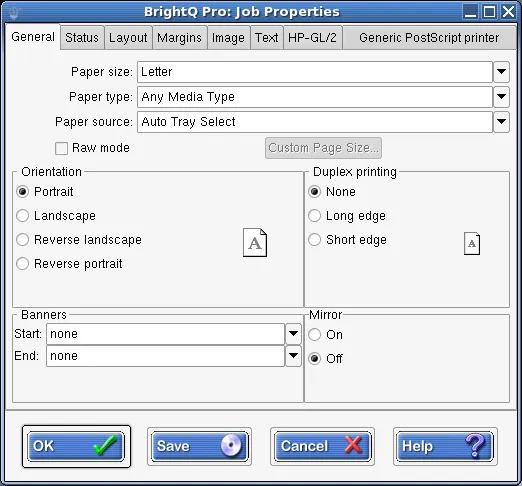
Print Job Manager General tab showing media, orientation, duplex, banners, and mirror options.
Page layout
Section titled “Page layout”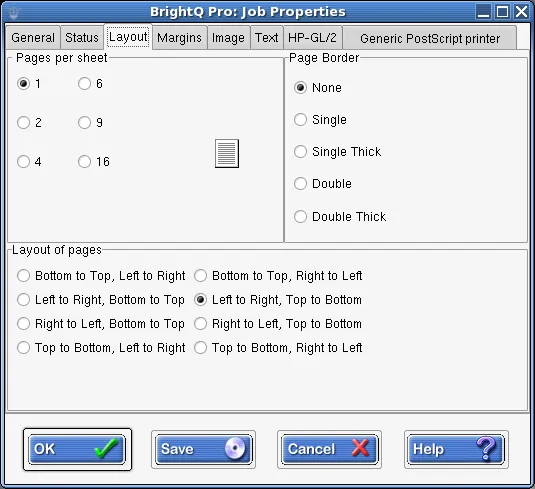
Print Job Manager Layout tab showing pages per sheet, borders, and page ordering.
| Task | Example |
|---|---|
| Print only odd pages | lp -o page-set=odd document.pdf |
| Print only even pages | lp -o page-set=even document.pdf |
| Reverse output order | lp -o outputorder=reverse document.pdf |
| Print four pages on a sheet | lp -o number-up=4 document.pdf |
| Add a single page border | lp -o page-border=single document.pdf |
| Print three copies (System V) | lp -n3 document.pdf |
| Print three copies (BSD) | lpr -#3 document.pdf |
The generic filter supports 1, 2, 4, 6, 9 and 16 pages per sheet and multiple page-order arrangements.
Paper size, source, finishing, duplex, and banners are printer-dependent. Use filter option reference for generic settings and review the installed driver’s PPD for device-specific features.
Before using a generic duplex or finishing option, inspect the queue’s supported names and values with codehost-config -C QUEUE. Use the values reported for that queue when a generic example differs from its driver.