Print Job Manager
Esta página aún no está disponible en tu idioma.
Print Job Manager (PJM) is the graphical interface for selecting the destination printer and its available job options. Launch it from an application configured to use BrightQ printing, or directly from a terminal:
pjm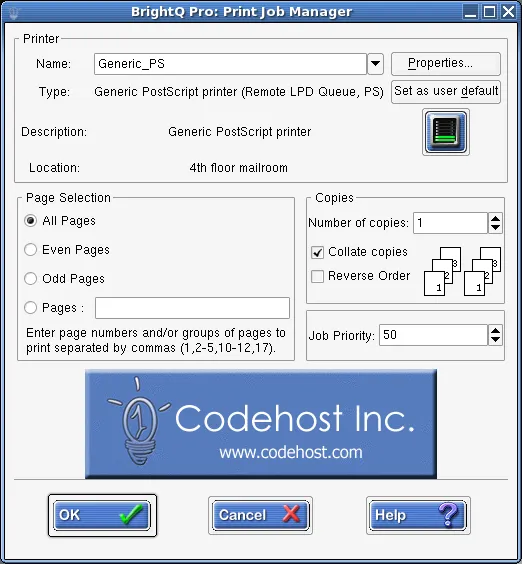
Print Job Manager showing printer selection, page selection, copies, collation, and job priority.
Common controls include choosing a printer, changing the user’s default printer, selecting pages, specifying copies and collation, and adjusting device-specific settings.
Job properties
Section titled “Job properties”| Tab | Typical settings |
|---|---|
| General | Media, paper source, paper type, orientation, duplex, banners and pages per sheet. |
| Status | Device status indicators and reported warnings. |
| Layout | N-up layout and page borders. |
| Margins | Custom margins for text and image files. |
| Image | Brightness, hue, saturation, gamma, scaling, and image position. |
| Text | Characters/lines per inch, columns and syntax highlighting. |
| HP-GL/2 | Monochrome pen, fit to page and pen width. |
| Printer-specific | Features defined by the installed driver and selected model. |
Some tabs or options appear only for supported file formats and drivers. Raw/unfiltered queues skip processing, so job properties will not necessarily affect the output.
Printer-specific properties
Section titled “Printer-specific properties”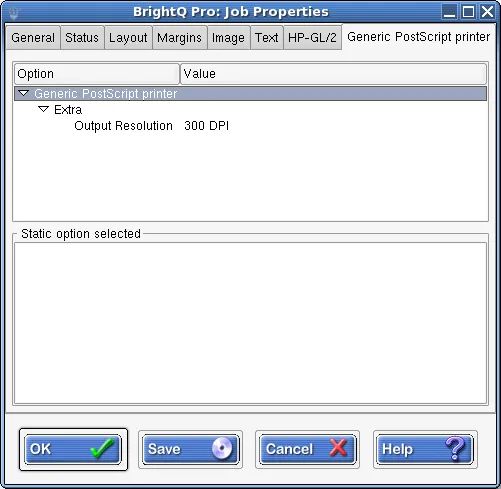
Print Job Manager printer-specific tab showing output resolution for a Generic PostScript printer.
For noninteractive printing, see shell printing and filters.